Download the templates
Nine blank PNG images, each at the size Amazon lists for its module, with the size written on it. Design on top of them and the image will fit the module without being stretched or cropped.
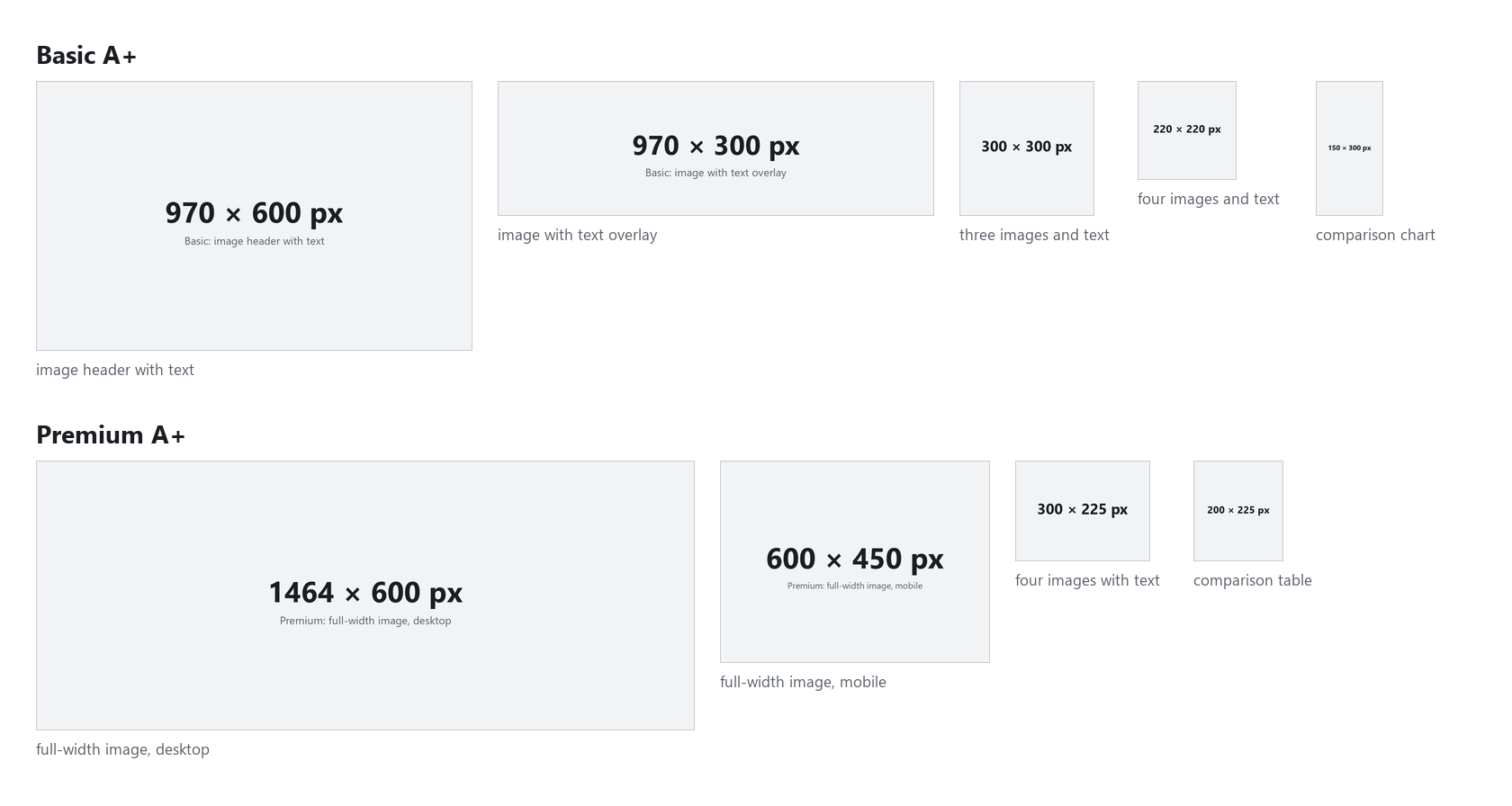
- Basic image header with text
- 970 × 600 px
- Basic image with text overlay
- 970 × 300 px
- Basic three images and text
- 300 × 300 each px
- Basic four images and text
- 220 × 220 each px
- Basic comparison chart
- 150 × 300 per product px
- Premium full-width image, desktop
- 1,464 × 600 px
- Premium full-width image, mobile
- 600 × 450 px
- Premium four images with text
- 300 × 225 each px
- Premium comparison table (the first style)
- 200 × 225 per product px
Every module and the file rules are in the A+ Content image sizes guide.
A page plan for Basic A+
Shoppers scroll one page, so plan the modules as one story: what it is, why it is better, how it is used, what comes with it, and which one to pick. Five modules that do that:
- 1. Image header with text, 970 × 600
- What it is and the one reason to buy it, with your product large.
- 2. Three images and text, 300 × 300 each
- Three features, one per image, each with a short line.
- 3. Image with text overlay, 970 × 300
- The product in use, with one line on the image.
- 4. Four images and text, 220 × 220 each
- The details people ask about: material, size, what is in the box.
- 5. Comparison chart, 150 × 300 per product
- Your own versions side by side, so a shopper can pick one.
A page plan for Premium A+
Premium A+ uses wider images and gives each full-width image its own mobile version, so every full-width module below is two files: 1,464 × 600 for desktop and 600 × 450 for phones.
- 1. Full-width image, 1,464 × 600 (600 × 450 mobile)
- What it is and the one reason to buy it.
- 2. Four images with text, 300 × 225 each
- Four features, one per image.
- 3. Full-width image, 1,464 × 600 (600 × 450 mobile)
- The product in use, in the place your buyer would use it.
- 4. Premium comparison table (the first style), 200 × 225 per product
- Your own versions side by side.
- 5. Full-width image, 1,464 × 600 (600 × 450 mobile)
- Your brand: who makes it, in your own words.
Using the templates
- Open the template in Canva, Figma or Photoshop as a design of the same size.
- Use the same colors, fonts and lighting in every module, so the page looks like one brand. Our A+ design guide covers how.
- Keep text large: many shoppers see these modules on a phone, where they are much smaller.
- Export a JPG at the template's size, in RGB, under 2 MB.
- In the A+ Content Manager, add the modules in your plan's order, upload each image and give it alt text of up to 100 characters.
- Before you submit, check the words against what gets A+ Content rejected: prices, "best" claims and other brands' names are the usual ones.
The whole process, from Brand Registry to review, is in how to create Amazon A+ Content.
Or let ReddStudio fill them
ReddStudio makes 6 full-width A+ modules from your product photos, in one style: 1,464 × 600 with a 600 × 450 mobile version each for Premium, or 970 × 300 for Basic. A+ Content comes with paid plans, from $9.99 for one listing. The free preview has the 6 listing images only.
FAQ
Does Amazon give you A+ Content templates?
Amazon gives you the modules: in the A+ Content Manager you pick a module type, such as an image header or a comparison chart, and each has a fixed layout with places for images and text. You supply the images at its sizes and the words.
What size is the A+ header image?
The Basic image header with text is 970 × 600 px. A Premium full-width image is 1,464 × 600 px, with a separate 600 × 450 px image for mobile.
Can I use the templates in Canva?
Yes. Upload the PNG and use it as the background of a design at the same size, or make a custom-size design with the numbers in the file name. Export a JPG at that size.
What file should I upload?
JPG, PNG or BMP in RGB color, under 2 MB per image. JPG keeps files small.
How many modules can an A+ page have?
It depends on the module types and on Basic or Premium, and Amazon changes it from time to time, so check what the A+ Content Manager allows your account. The plans below use five.