
The example
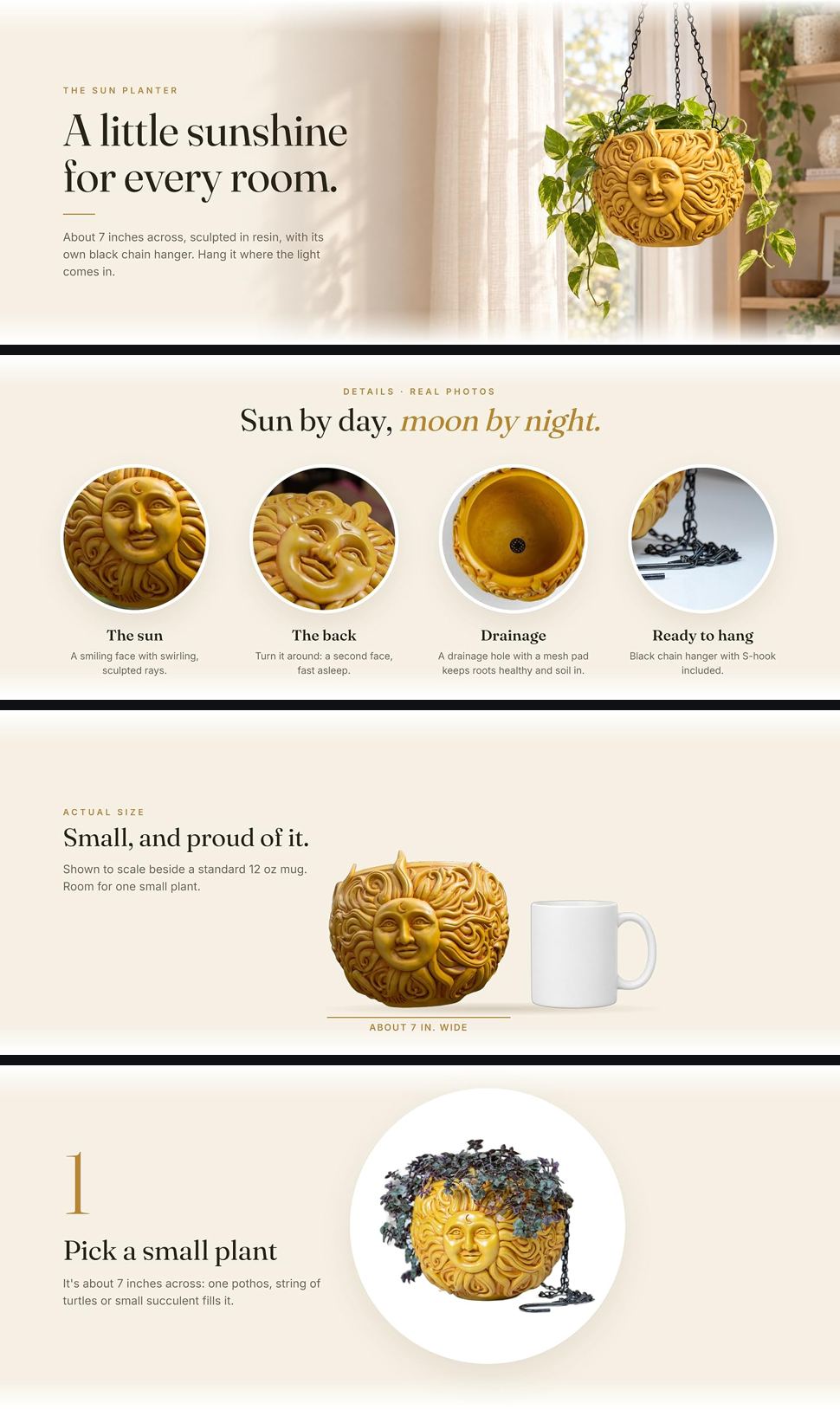
This is the live A+ page of the Sun Face Hanging Planter by Nebula Colors, a small resin planter about 7 inches across. It uses 6 Premium modules. Four of its 12 picture panels are below, as they appear on Amazon.
What each module does
Module 1
The hero
One full-width image: "A little sunshine for every room." with the size, the material and the hanger in one short line. The buyer knows what it is before scrolling.
Module 2
Real-photo details
One full-width image with four close-ups labelled "Real photos": the face, the sleeping face on the back, the drainage hole with its mesh pad, and the chain with its S-hook.
Module 3
Styled rooms
A carousel of 4 panels: the planter in a reading nook, a porch, a sunroom and a bedroom, each labelled "Styled". One short line each, no claims.
Module 4
Actual size, then three steps
A carousel of 4 panels. First, the planter beside a 12 oz mug with "About 7 in. wide" under it. Then three numbered steps: pick a small plant, lay the mesh pad and add soil, hang it and water lightly.
Module 5
FAQ
Text answers to the questions buyers ask: how big it is, whether the color matches the photos, what comes in the box, and whether it's ceramic (it's resin).
Module 6
The pair
A carousel of 2 panels: the sun planter, then its moon twin, labelled "Sold separately". The page ends on the seller's next product.
What to copy from it
- Give each module a clear job. Carousels let one module hold several panels.
- Label real photos and styled scenes, so buyers can tell the real thing from the staging.
- Show size with a familiar object as well as the number.
- Give the how-to steps, and answer the questions buyers ask in an FAQ module.
- Every claim is a fact from the listing: 7 inches, resin, chain hanger, drainage hole, mesh pad. No "premium", no "best", no badges.
- End on your own next product, clearly marked as sold separately.
Related
For the planning side, read how to design A+ Content. For the listing images ReddStudio made for the same planter, see the sun face planter example.
FAQ
How many modules should A+ Content have?
As many as you have real questions to answer. The example here uses 6 of the 7 Premium module slots, and its carousels fit several panels into one module. A module that repeats another one is better left out.
Should A+ use real photos or styled scenes?
Both, and say which is which. The example labels its close-ups "Real photos" and each panel of its styled room carousel "Styled", so buyers can tell the real thing from the staging.
How do I show size in A+?
Put the product next to something everyone knows, like a 12 oz mug, and write the measurement on the image.
Can A+ mention my other products?
Yes, your own. The example ends with the matching planter, labelled "Sold separately". Comparing with another brand is not allowed.